Digital Support Tool
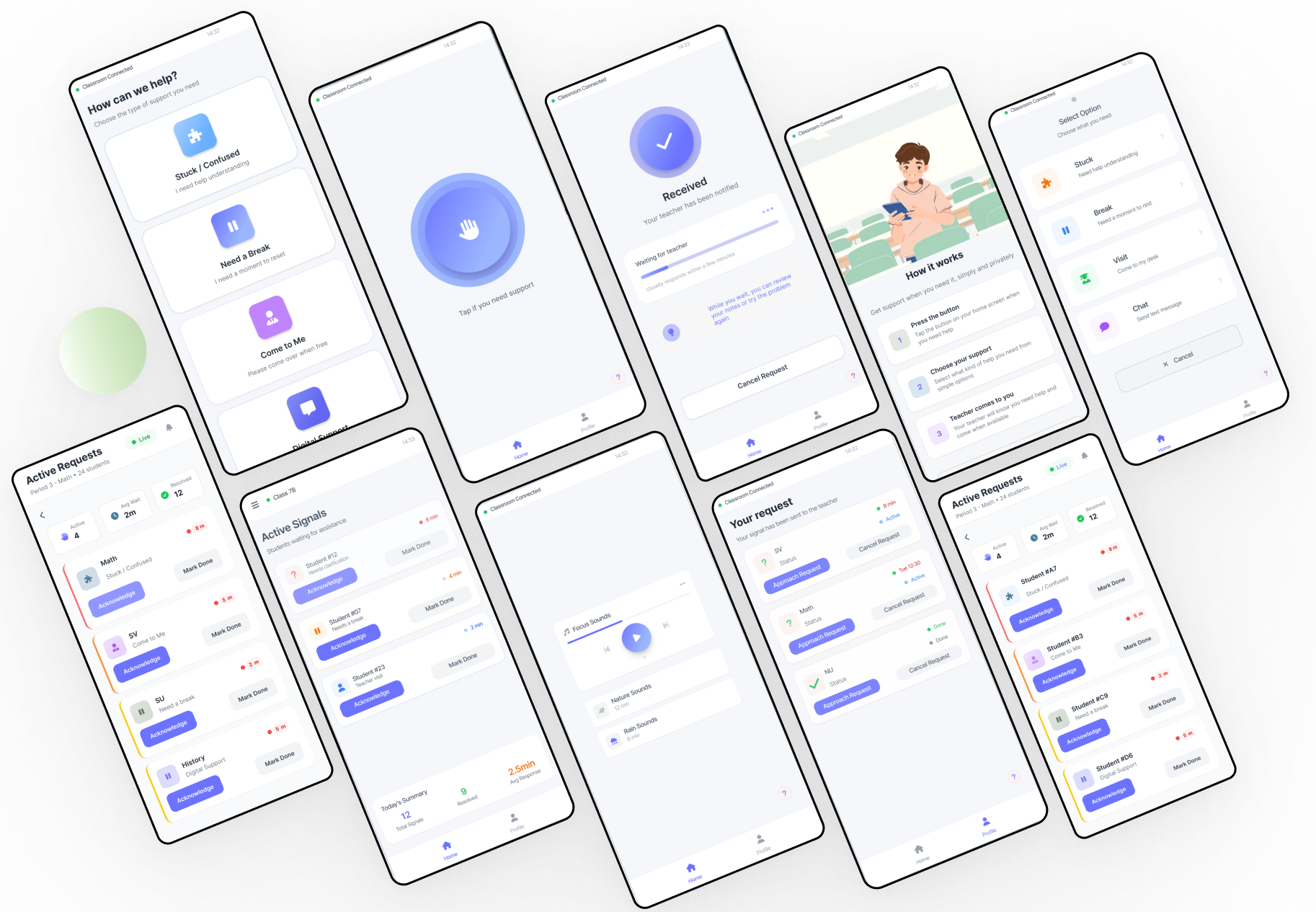
This case study explores the development of a digital support tool designed to act as a low-threshold step for students to ask for help without social exposure. More importantly, it serves as an exploration of the "AI Designer" role—demonstrating how artificial intelligence can be seamlessly integrated into the UX/UI methodology to enhance accessibility, empathy, and systemic design without replacing human judgment.
Tools & tech
My role
The assignment
The challenge
Challenge
Solution
Key features
Results
- Delivered a frictionless signaling flow characterized by highly predictable interactions.
- Effectively eliminated decision fatigue by intentionally minimizing user choices.
- Established a demonstrable framework for how AI can accelerate inclusive design.
The AI Designer workflow
Workflow & structure
- •Strategic Co-Piloting: AI was utilized not as a decision-maker, but as an expansive analytical tool to challenge assumptions, identify broad patterns in cognitive research, and synthesize complex behavioral data.
- •Rapid Context Mapping: Employed generative models to quickly compile literature on neurodivergent classroom challenges (e.g., ADHD, autism), effectively extracting core themes like initiative difficulty and fear of judgment.
Prompt logic
- •The R.A.K.T.F. Framework: Adopted a highly structured prompting model (Role, Action, Context, Tone, Format) to steer generative responses toward empathetic and design-relevant outputs.
- •Iterative Precision: Transitioned from generic exploratory prompts to highly constrained queries, systematically reducing AI hallucinations and bias while increasing contextual relevance.
Collaboration
- •Edge-Case Simulation: Leveraged AI to simulate extreme user scenarios—such as a student experiencing a panic attack—to proactively stress-test the prototype’s visual hierarchy and interaction complexity.
- •Human as the Final Arbiter: Maintained a strict human-in-the-loop philosophy. Every AI recommendation was critically filtered through the lens of human empathy, recognizing AI’s inability to truly understand emotions like shame.
Production & delivery
- •Accessibility Auditing: Utilized AI models to conduct deep-dive reviews against WCAG 2.1 AA criteria, ensuring contrast ratios and typographic scales met rigorous cognitive accessibility standards.
- •Microcopy Optimization: Collaborated with language models to strip unnecessary cognitive load from UI text, resulting in a neutral, non-judgmental, and highly concise feedback messaging.
Systems thinking
- •Scope Containment: Used systemic analysis to intentionally restrict the prototype to a singular function (signaling), adhering to the educational insight that feature sprawl actively harms accessibility in this context.
- •Ethical & Regulatory Compliance: Engineered the solution to naturally adhere to data minimization principles (GDPR) by avoiding any diagnosis-specific categorization within the UI.
My approach
1. The AI-Designer Mindset
Approaching this project, I defined the AI-Designer role not as relying on AI to generate interfaces, but as establishing a symbiotic feedback loop where AI scales analysis and the designer safeguards empathy.
2. Structuring the AI Workflow
To prevent AI from generating noise, I established a strict operational methodology:
- •Define Intent: Clearly articulate the specific UX problem before engaging AI.
- •Constrain Context: Provide rigid boundaries using the structured R.A.K.T.F framework.
- •Evaluate & Filter: Scrutinize outputs against human psychological principles.
- •Iterate: Refine prompts based on identified biases or gaps in the AI's logic.
3. Transforming Insights into UI
Through the AI-assisted research phase, the overwhelming theme was 'cognitive overload'. I translated this insight directly into the UX architecture by:
- •Replacing complex navigation with a linear, single-action screen sequence.
- •Eliminating descriptive text in favor of universally recognized iconography.
- •Structuring the Figma components to enforce a minimalist, high-contrast design system.
4. Ethical Safeguarding
A core part of my approach was recognizing where AI fails. I took complete ownership of the ethical implications, ensuring the final visual and interaction design felt inherently human, safe, and entirely free of stigmatizing language.
5. Toolkit Ecosystem
- •Generative AI (ChatGPT/Gemini) for simulation and synthesis
- •Figma for high-fidelity component design and wireframing
- •WCAG 2.1 AA frameworks for accessibility benchmarking
6. Case Study Impact
This project serves as a definitive case study for the modern AI Designer. It proves that when AI is harnessed through structured methodologies and ethical oversight, it empowers designers to solve deeply complex, human-centric problems with greater precision and inclusivity.
Conclusion
In high-stress UX scenarios, forced simplicity and linearity are vastly superior to offering customizable flexibility.
Immediate, unambiguous visual confirmation is the strongest tool for building user security.
The most effective inclusive designs occur when algorithmic analysis is strictly governed by human empathy.